.png)
Manually following up, filling out forms one by one, copying answers into the CRM: these are the tasks that Clay, Lemlist, and n8n aim to automate. But should you combine Clay, Lemlist, and n8n to automate your lead generation, and in what order?
Not necessarily all three, and rarely right away. Lemlist is enough to get started: it contacts your prospects via email, LinkedIn, or phone according to a sequence. Clay comes into play when data quality becomes an issue, to enrich and qualify your contacts. n8n then connects Clay, Lemlist, and your CRM when your rules span multiple tools.
The pitfall is piling up subscriptions without linking them together: Clay access on one side, a Lemlist campaign on the other, and a Zapier running in the background. Follow-ups then remain manual, prospect lists are scattered, and responses aren’t tracked in the CRM.
In this article, you'll learn exactly:
- what a prospecting stack is and how to build one;
- How to Use Clay for B2B Prospecting;
- what Lemlist is, how it's used for lead generation, and its limitations on LinkedIn;
- How n8n connects Clay, Lemlist, and your CRM through four workflows;
- Mistakes to Avoid When Using a Clay, Lemlist, and n8n Stack;
- what the GDPR requires before launching an automated marketing campaign;
- the differences between Clay and Lemlist, and how to evaluate Lemlist;
- pricing information for Clay, Lemlist, and n8n, taken from their official websites;
- Choose the right stack based on what's holding back your prospecting, using an interactive tool.
The key is knowing which tool to add—and when. Understanding which tool covers which step, what each one charges, and which automations truly require n8n will help you avoid piling up subscriptions that don’t integrate with each other. You’ll also avoid sending automated messages before verifying compliance with the GDPR and LinkedIn’s rules.
At Scal-IA, we always start with the target audience and the message; the tools come next. Our agency applies this approach on your behalf.
What is a prospecting stack, and how do you build one?
An automated lead generation stack is a sequence of tools that takes a lead from the raw list to a meeting. It consists of four stages: enrichment, segmentation, activation, and follow-up.
Data enrichment transforms a list of names into actionable records: verified work email, phone number, exact job title, company size, and recent activity. Segmentation determines who receives which message, based on criteria set in advance according to your ideal customer profile (ICP). Activation is the actual sending of the message. Follow-up synchronizes every interaction with your CRM, so your sales reps know the status of each prospect.
Each tool should cover one or more of these steps. It is this criterion—not the tool’s popularity—that should guide your choices. Our guide to sales prospecting with AI puts this stack into the broader context of the method.
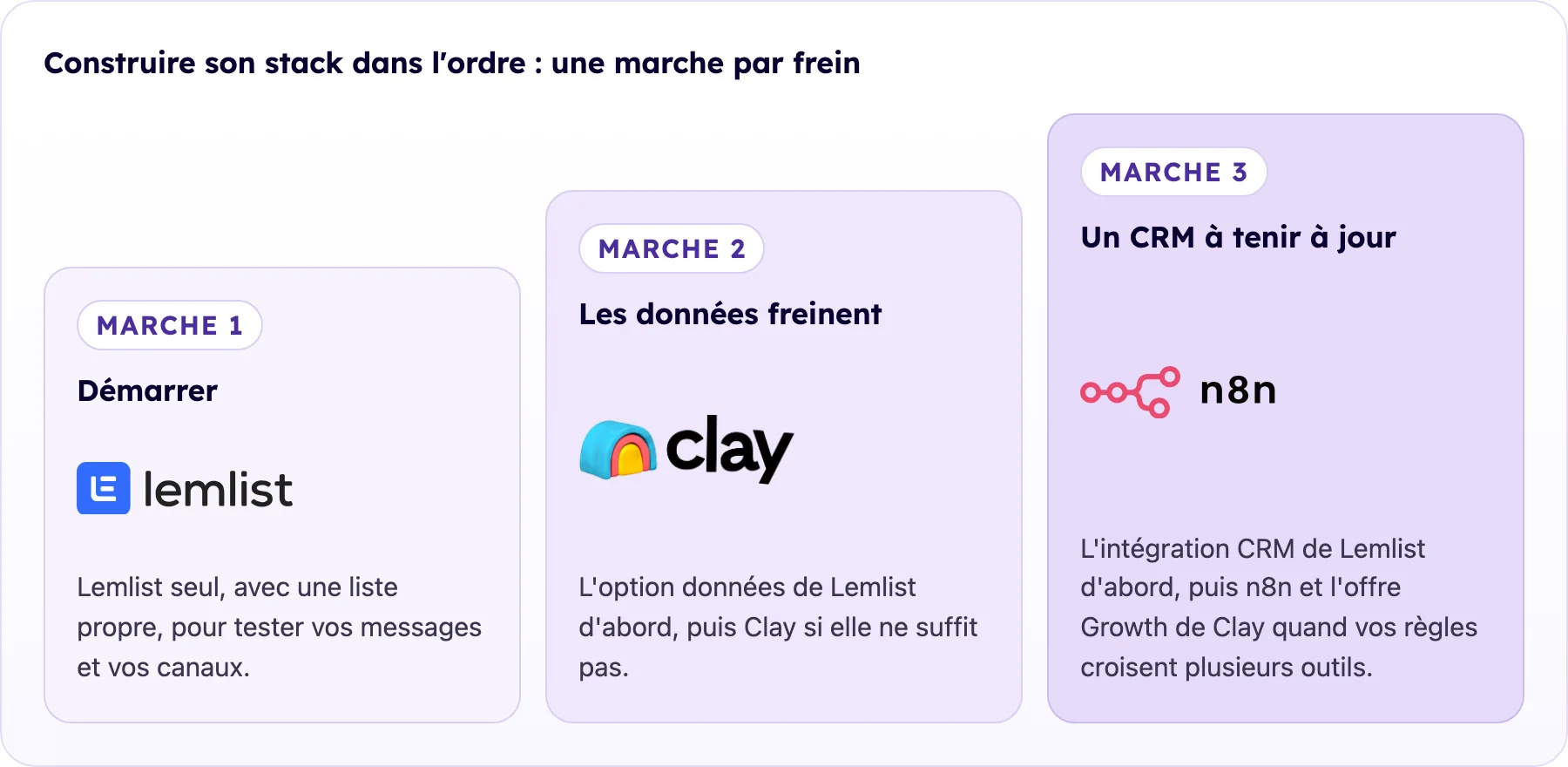
Each step is added only when its obstacle appears, as detailed in the section “Which stack should you choose based on what’s holding back your prospecting?” In Step 3, n8n writes to Clay only with Clay’s Growth plan, the most expensive option in the pricing table. Logos are reproduced for illustrative purposes only. Clay, Lemlist, and n8n are trademarks of their respective owners.
How to Use Clay for B2B Lead Generation?
Clay is a data platform that displays your contacts in a table format. Each row represents a contact or a company; each column represents imported data or the result of an automated action. More than just a directory, Clay connects to numerous data sources and queries them one by one.
What is Clay's waterfall enrichment?
Waterfall enrichment queries multiple data providers in the order you choose. If the first provider cannot find a contact’s email address, the second takes over, followed by the third. Clay describes it this way: “Waterfall enrichment lets you search sequentially across multiple tools until you find a valid match” (Clay’s page on waterfall enrichment). The benefit is simple: no single provider covers all contacts, so the waterfall approach fills in the gaps left by the others. Credit usage depends on your Clay plan; be sure to check it before running a waterfall process on a large list.
Creating a Contact Table in Clay
Here is a typical structure, column by column:
- contact name, imported from LinkedIn Sales Navigator or a CSV file;
- company and website;
- verified email address, obtained through a chain of providers;
- company size and industry;
- tools used by the company, when such information is available;
- recent developments: fundraising, job opening, change in position;
- priority score, calculated using a conditional formula;
- send segment, automatically deducted from the score.
The update can then be automated, either through recurring imports or via a webhook. A webhook is an address that receives data sent by another tool, without human intervention.
How does Clay personalize messages using AI?
Clay incorporates AI agents, called Claygents, which the publisher describes as follows: “Research target companies and people with AI” (Claygent page). In practice, a Claygent searches for news about a company; an AI column can then draft a lead sentence based on the data in that row. You leave Clay with an enriched contact and an opening sentence ready to be inserted into your email sequence. Clay can even send it directly to Lemlist: its documentation states that “The Lemlist integration in Clay allows users to send per-lead data from Clay” (Clay’s Lemlist integration). On its pricing page, Clay’s Launch plan includes this feature: “Use Clay’s email sequencer or a sequencing integration.” Review a sample before each send: a hook generated from incorrect data stands out immediately.
What is Lemlist, and how is it used in lead generation?
Lemlist is a sales prospecting software that sends sequences of personalized messages across multiple channels. The provider summarizes its scope as follows on its pricing page: “Reach leads via email, LinkedIn, calls, WhatsApp, and SMS.” Within the tech stack, Lemlist serves as the activation layer: it executes the sequence, manages timing, and can stop the sequence for a prospect who responds, depending on your settings.
Lemlist Features That Are Useful for Lead Generation
- Multichannel sequences: a single journey combines emails, LinkedIn actions, and calls; LinkedIn automation and integrated calling are part of the Multichannel offering.
- Conditions: The next step in the sequence depends on the prospect's behavior or their data.
- Conditional personalization: Liquid syntax adapts a portion of the message based on contact data.
- Personalized images: An image in the message includes the recipient’s first name or logo; use this sparingly to show that the message was tailored for the person without making them feel like they’re being watched.
- AI Agents: Lemlist's pricing page mentions "lemAgent Signal, Enrichment, & Messaging AI agents" for identifying signals, enriching content, and drafting messages.
- Deliverability: Reactivating dormant email addresses and adjusting daily volumes.
How do I create a Lemlist multichannel campaign?
A Lemlist campaign is structured like a simplified decision tree. You choose the channel for each step, the time interval between steps, and the exit conditions. On LinkedIn, Lemlist offers options such as profile visits, connection requests, and messages, which can be scheduled between two emails. Exercise caution with these steps: LinkedIn’s Terms of Service prohibit “using bots or other unauthorized automated methods to access the Services, add or download contacts, or send or redirect messages” (LinkedIn Terms of Service). This prohibition applies regardless of volume: automating these steps remains a risk to your account, for which you are solely responsible. At the very least, keep important messages manual.
Sample sequence for an SME target audience; test it and then adjust it based on your responses:
- Day 1: Personalized introductory email;
- Day 3: Review the LinkedIn profile;
- Day 5: Send a LinkedIn connection request with a short note;
- Day 8: Follow-up email from a different angle;
- Day 12: LinkedIn message if the connection request is accepted;
- Day 16: Final email, politely wrapping up the exchange.
Our article on creating a multichannel prospecting sequence details the timing and messaging for each step.
How do I customize a Lemlist email for the recipient (Liquid syntax)?
Lemlist supports a conditional syntax inspired by Liquid. A condition displays one section if a contact’s data meets a certain criterion, and another section otherwise. The same principle applies to a trigger: if the “job opening” column is filled in Clay, the email mentions that job opening; if it’s empty, a neutral version is displayed. You don’t have to write fifty versions of an email—you write one that accounts for its variations.
How does n8n connect Clay, Lemlist, and your CRM?
Clay enriches data, Lemlist triggers actions, and integrating Clay is all it takes to transfer a contact from one to the other. But who keeps the CRM up to date and handles exceptions—such as a reply, an invalid email address, or an unsubscribe? Lemlist offers CRM integrations: its pricing page lists “CRM integrations & API” starting with the Email plan. When this native synchronization isn’t enough, that’s where n8n comes in—a low-code automation tool: you assemble visual blocks and only write code if you want to. n8n comes in handy when a decision involves multiple sources—for example, the Clay score and the account status in the CRM—or when an exception needs to be propagated across all tools.
There’s one cost consideration to keep in mind before integrating n8n with Clay. Clay’s pricing page specifies that the HTTP API, webhooks, and CRM synchronization are available only with the Growth plan, which adds “Integrate with any HTTP API; Automate any signal via webhook” to the features included in the Launch plan. Without it, n8n can control Lemlist and the CRM, but cannot write data to Clay.
Why n8n instead of Zapier, and what does its license say?
The main difference lies in the billing model. Zapier counts each action executed: “A task is any successful action that runs in Zapier” (Zapier Help Center). n8n Cloud counts workflow executions: “Pricing based on monthly workflow executions, regardless of complexity.” For a multi-step lead generation workflow, this second model may be easier to understand: calculate the costs for both based on your own volumes before making a decision.
n8n can also be hosted on your own server. Be aware of a common misconception: n8n is not open-source software in the strict sense. Its license, the Sustainable Use License, states: “You may use or modify the software only for your own internal business purposes or for non-commercial or personal use” (n8n license). The license therefore limits use to your company’s internal needs: be sure to verify this with n8n before deploying the software on behalf of a client.
Our guide to n8n for automating B2B lead generation without coding explains how to get started with the tool.
The 4 n8n Workflows to Set Up
Each workflow follows the same pattern: a trigger, followed by an action in one of the tools in the stack.
Workflow 1: Automatic Sending to Clay
Trigger: A new lead is added to your CRM via a form, a LinkedIn connection, or an import. Action: n8n sends this contact to a dedicated Clay table via the table’s webhook (Clay’s Growth plan).
Workflow 2: Conditional Registration in Lemlist
Trigger: Clay completes the enrichment of a contact, and its score exceeds the defined threshold. Action: n8n checks the CRM to verify that the account is neither a customer nor in negotiations, then adds the contact to the Lemlist campaign for its segment. If the only rule is “score above the threshold,” Clay’s integration is sufficient, and this workflow is unnecessary.
Workflow 3: Updating the CRM Without Lemlist Integration
Trigger: A prospect responds or clicks on your links multiple times. Action: n8n creates or updates the CRM record, changes the lead’s status, and notifies the relevant sales representative. Our article on the role of CRM in tracking multichannel prospecting explains how to structure this tracking process.
Workflow 4: Handling Bounces and Unsubscriptions
Trigger: Lemlist detects an invalid email address or an unsubscribe. Action: n8n marks the contact as excluded in Clay and in the CRM, and adds it to a suppression list. Have this list checked before each new import to ensure that a re-imported contact is not re-added to the sequence.
How does a contact move from the list to the CRM?
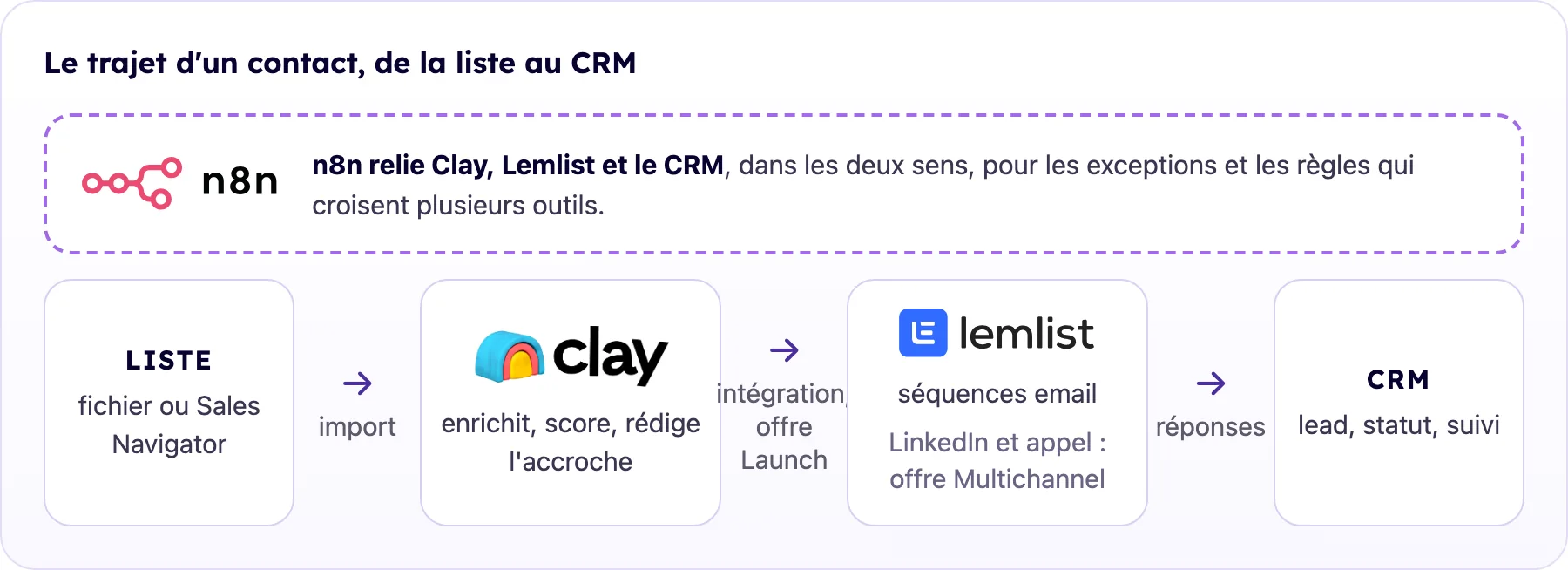
The arrows follow the flow: importing the list into Clay, integrating Clay with Lemlist starting with Clay’s Launch plan, and responses sent back to the CRM by Lemlist. The dotted line represents n8n; according to Clay’s pricing page, webhooks and HTTP APIs are included in the Growth plan. Logos are shown for illustrative purposes only. Clay, Lemlist, and n8n are trademarks of their respective owners.
The list exported from Sales Navigator or a file is imported into Clay, which enriches it, scores it, and drafts the subject lines. Qualified contacts are sent to the Lemlist campaign for their segment, either directly or via Workflow 2. Lemlist manages deadlines and follow-ups, and reports responses back to the CRM through its integration; n8n takes over for exceptions and rules that span multiple tools. In the CRM, a positive response becomes an assigned lead, while a “not now” response becomes a long-term follow-up.
What mistakes should you avoid when using a Clay, Lemlist, and n8n stack?
These errors occur when you combine Clay, Lemlist, and n8n without going through the commercial process.
Start with the tool rather than the process
Your tech stack should reflect your business process, not the other way around. Start by sketching out your ideal workflow on paper: automation doesn't fix a broken process—it amplifies it.
Automate Decision-Making Processes
Automate repetitive, low-value tasks; focus on interactions that build relationships. Our article on automation without dehumanization explores this topic in depth.
Ignoring the entry list
A perfect stack powered by a poorly targeted list results in wasted mailings. The quality of your ICP determines everything that follows.
Ignore deliverability
Neither Clay nor n8n protects your domain. Rotate your sender addresses, spread out your emails, and stick to the volumes recommended by Lemlist.
Do not monitor the stack
An n8n workflow can fail without any warning. Set up alerts for critical workflows and check your Lemlist dashboards every week.
GDPR and Automated Marketing: What Should You Check Before Getting Started?
Building a database and contacting professionals is still subject to certain restrictions. According to the CNIL, email marketing to professionals may be based on legitimate interest “when the purpose of the solicitation is related to the profession of the person being contacted” (CNIL, email marketing). The same page sets out two conditions that directly apply to this stack.
- Note: For data obtained from third parties—which is the case with data enrichment—the CNIL specifies that “it is necessary to ensure that the data subject has been informed of the possible use of their email address.”
- Opt-out: This page summarizes the rule in three words: “Simple and free opt-out.” Each email therefore provides a way to opt out of messages, and Workflow 4 reflects this opt-out across all tools.
These rules apply to email. Phone calls, text messages, and WhatsApp are subject to different rules; please check the CNIL website before enabling these channels in Lemlist. Finally, Clay, Lemlist, and n8n Cloud all process your prospects’ data: before importing contacts into any of these platforms, read each one’s data processing agreement and note where the data is hosted. This is a legal verification that is specific to your company.
Clay and Lemlist: What Are the Differences, and How Should We Evaluate Lemlist?
The two tools overlap in terms of contact search, but not in terms of their core functions. The table below compares them based on their official websites.
To form an opinion about Lemlist, consider four criteria. First, the channels your sequences require, then the level of customization (conditions and variables). Next, the quality of the data found on your specific target audience. Finally, consider the cost as your team grows, since the Multichannel plan is billed per user. You can evaluate these criteria during the trial by running a real campaign.
What are the pricing plans for Clay, Lemlist, and n8n?
The three tools do not charge the same rates. The table below lists the prices posted on their official websites on October 6 and 7, 2026, excluding taxes; these prices change frequently and vary depending on the selected volume.
The hardest item to predict is Clay: its usage depends on the number of contacts, the length of the workflows, and the AI columns. Test a table with about 100 contacts using the free plan, track the actions and credits used, then extrapolate to your monthly volume. Two questions will then help determine your budget: Do your sequences require automated LinkedIn steps (Lemlist Multichannel)? And does n8n need to write to Clay (Clay Growth)?
Which stack should you choose based on what's holding back your lead generation?
You don't have to use all three tools from day one. Here's how we at Scal-IA break it down: the right level depends on what's holding you back right now, and the cost to get started for each tier is listed in the pricing table.
Take it to the next level when a manual task comes up every week and starts to cut into your appointments—not before.
If you're just getting started, our article on automated lead generation for small and medium-sized businesses without a complex technical stack offers a more accessible introduction.
Conclusion: Should you combine Clay, Lemlist, and n8n for lead generation?
Not right away. Lemlist alone is enough to get started and test your messages; Clay, and then n8n, are only worth considering once their limitations become apparent. Each additional tool comes with a subscription fee and requires time to set up.
The order therefore follows your priorities, as shown in the “Which Stack to Choose” table. Incomplete data: use Lemlist’s data option first, then Clay if that’s not enough. Responses to sync: use Lemlist’s CRM integration first, then n8n and Clay’s Growth plan—the most expensive option in the pricing table—when your rules involve multiple tools. The key indicator remains the same: a manual task that comes up every week and is starting to cost you appointments.
In any case, your target audience, your message, and your approach take precedence over automation, which comes into play only after you’ve verified compliance with the GDPR and LinkedIn’s rules.
At Scal-IA, we follow this approach with our clients: first the target audience and the message, then automation. If you'd prefer to outsource this automation, our agency can handle it.
Frequently Asked Questions About Clay, Lemlist, and n8n
Can anyone use Clay without technical skills?
Yes, for everyday use: Clay works like an advanced spreadsheet, and the free plan lets you practice with it. Conditional formulas and cascading formulas, however, require some time to learn, so be sure to set aside time for that before sending your first message.
Can Lemlist replace Brevo or Mailchimp?
No. Lemlist is designed for individual lead generation and sales sequences. Email marketing to a subscriber list is handled by a different tool.
Is Lemlist available in French?
Yes, regarding documentation: Lemlist's Help Center has a French version titled "Tips and Answers from the Lemlist Team." We haven't checked the interface language—please check it during the free trial.
How do I use Lemlist for my first campaign?
Import a clean list, create a campaign, add the steps in the sequence and their timeframes, customize the variables, and then test the email by sending it to your own email address. Start with a small volume and review the responses before scaling up.
Is n8n a better option than Zapier for lead generation?
Zapier is a good choice for getting started with a few simple automations. n8n becomes more useful when your workflows have many steps, conditions, and calls to multiple tools. On n8n Cloud, you’re billed for the entire execution rather than for each individual action; calculate the costs of both options based on your usage volumes.
What does Scal-IA offer in terms of automated B2B lead generation?
Scal-IA offers automated B2B lead generation, from intent detection to multichannel automation.
Can Clay send contacts to Lemlist without n8n?
Yes. The Clay integration, included in the Launch plan, forwards each contact and their data—including the subject line—to a Lemlist campaign. n8n is only useful for rules and syncs that go beyond this direct connection.